Introduction
Note-taking is a fundamental skill for self-directed learning, yet it can be challenging for teachers to monitor and guide students effectively during lessons. Administrative burdens can further complicate this process. However, with Goodnotes Classroom, teachers can easily oversee students' notes in real time, enhancing the learning experience. In this article, I'll share how I teach note-taking using Goodnotes Classroom.
Why Note-taking Matters
Note-taking is more than just writing down what is heard; it involves actively processing information, identifying key points, and summarizing content. Effective note-taking helps students retain information, organize their thoughts, and develop critical thinking skills.
Setting Up Goodnotes Classroom
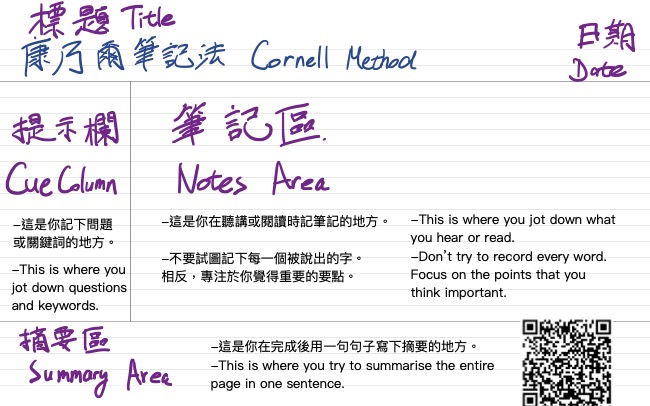
To begin, create a template for your students choose a note-taking template. Goodnotes offers various templates, but I particularly love the Cornell Notes template. Here's a step-by-step guide:
- Create a Template: Choose the Cornell Notes template within Goodnotes. This template is designed to help students systematically organize their notes.
- Share the Template: Convert the template into a classroom document and share it with your students. This ensures everyone starts with the same format.
Teaching the Note-taking Process
During each lesson, guide your students to take notes by focusing on the following elements. You may also download this template (as shown in the video) for more reference.

- Title and Date: Ensure each note page starts with a clear title and the date.
- Key Points: Instruct students to identify and write down three key or important points from the lesson.
- Questions: Encourage students to note down at least one question related to the content. This promotes critical thinking and engagement.
- Summary: Ask students to write a one-sentence summary at the end of their notes. This helps reinforce their understanding and retention of the material.
Leveraging Goodnotes Classroom for Interactive Feedback
Goodnotes Classroom offers powerful features to enhance the note-taking process: that can help students stay on the right track when taking notes.
- View Student Notes: With a simple click of an icon, you can easily view different students' notes in real time.
- Annotate and Highlight: By tapping "Feedback" under a student's avatar, yYou can annotate directly on the students' notes, highlight important points, and provide feedback. This immediate interaction helps students understand what they did well and where they can improve.
- Add Stickers: Use stickers to provide visual feedback and reminders. This can make the feedback process more engaging and less intimidating for students.
- Showcase Good Examples: Display exemplary notes to the entire class by tapping the "Present" button under the student's avatar. This peer learning approach allows students to learn from each other's strengths and techniques.
Combining Self-directed and Peer Learning
By using Goodnotes Classroom, self-directed learning and peer learning can be seamlessly integrated into your lessons. Students not only learn to take effective notes on their own but also benefit from seeing how their peers approach the same task. This combination fosters a collaborative learning environment where students can thrive.
Conclusion
Teaching note-taking with Goodnotes Classroom not only simplifies the monitoring process for teachers but also enhances the learning experience for students. By providing real-time feedback and facilitating peer learning, educators can help students develop essential note-taking skills that will benefit them throughout their academic journey.
For more tips on using digital tools in the classroom, check out other articles on the Goodnotes Classroom Learning Center. We would love to hear about your experiences and any additional tips you have—share your stories in the comments below!